Virtualization vs Containerization
Let's take a moment to compare virtualization versus containerization. Virtualization is the act of running a virtual computer or virtual machine (VM). A virtual computer is something you can run on your own personal computer using VMware, for example, but it is also the way cloud computing works. In cloud computing, you have giant powerful racks of computers, and when you want to run an instance, which is a virtual machine, on that environment, you get a tiny slice of some number of CPU cores and some amount of memory, and that's your virtual computer. Containerization is different.
How They Compare
Consider the structure of your own personal computer. There is some hardware involved, and then sitting on top of it is an operating system. Your home computer is probably running Windows or macOS, and then you can install and run different applications on that computer. Now, if you wanted to run virtual computers on your home computer, you would install a program called a hypervisor. The hypervisor is a platform on which virtual computers can run (and in some cases, even the host OS). Each of those virtual computers is like a box inside of which you see the same things you would originally have on your home computer, which includes the operating system and the libraries required to run certain applications. That's a virtual machine. You can have a second virtual machine that runs a completely different operating system, has different applications installed, and they are separate.
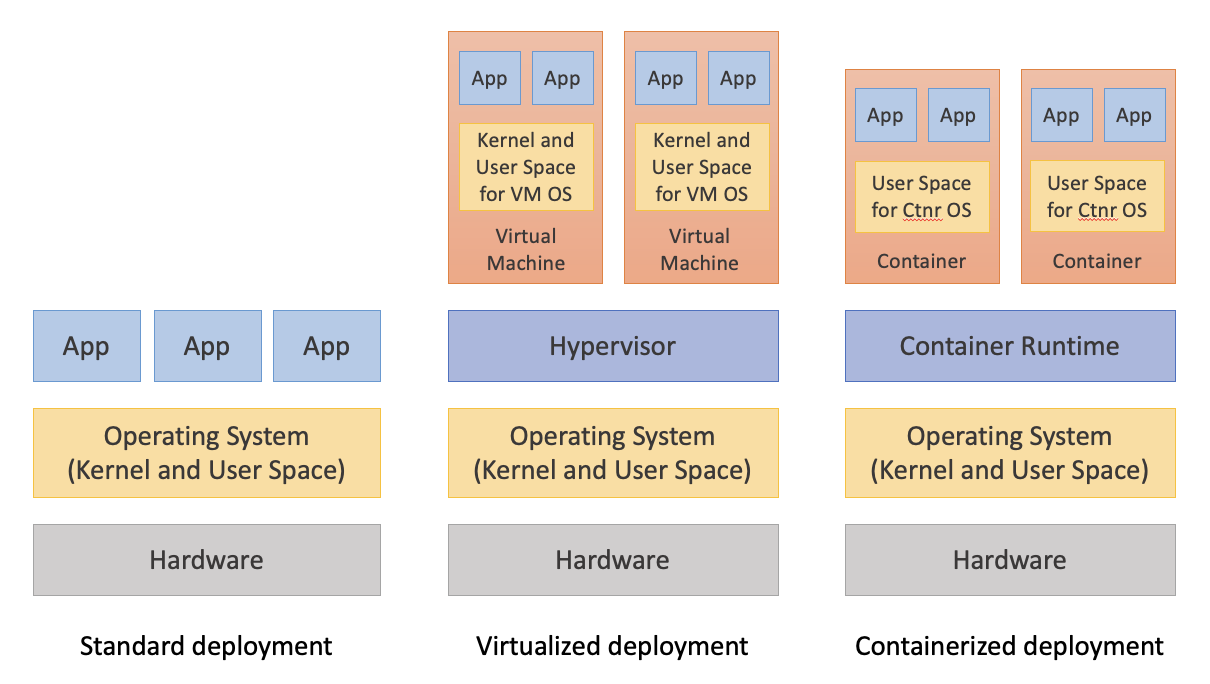
A container is a very similar concept, except that instead of a hypervisor, you run a container runtime. So this would be the Docker or Apptainer platform. Inside it you can run your different applications that have been containerized, together with the user-space parts of the OS from which the applications originated. What you will notice is that the containers do not have their own kernel, which is the basic operating system element that was present in the virtual computers. That is a significant difference. Operating systems take up a lot of space and take a while to boot up. That is why containers are smaller and can start a lot faster: they use the kernel from the host system and are able to share more of the host computer's resources in that way.
As a clarification for anyone wondering how this differs from cloud computing, there is actually another level to which you could take this. You could have a virtual computer, and inside that computer you could install the container runtime and run containers inside it. So you would have containers inside a virtual computer running on a physical computer.
Feature Comparison
| Feature | Virtualization | Containerization |
|---|---|---|
| Operation level | Operating system | Applications, plus user space of OS |
| Startup speed | Slower | Faster |
| Size | Larger | Smaller |
| Isolation | OS level | Process level |
| Portability | Limited | High |
| Security | Stronger | Weaker |
To summarize, virtual computers are virtualized at the operating system level, and containers are virtualized at a partial-OS level to support applications. The startup speed for a container is much faster than for a virtual computer, and the size is much smaller than a virtual computer. Containers are highly portable, whereas virtual computers are not. However, virtual computers have stronger security potential because they have the entire operating system available to set up firewalls and protect what's inside the virtual computer. Containerization does not have quite as many features in that regard.
CVW material development is supported by NSF OAC awards 1854828, 2321040, 2323116 (UT Austin) and 2005506 (Indiana University)