Animations
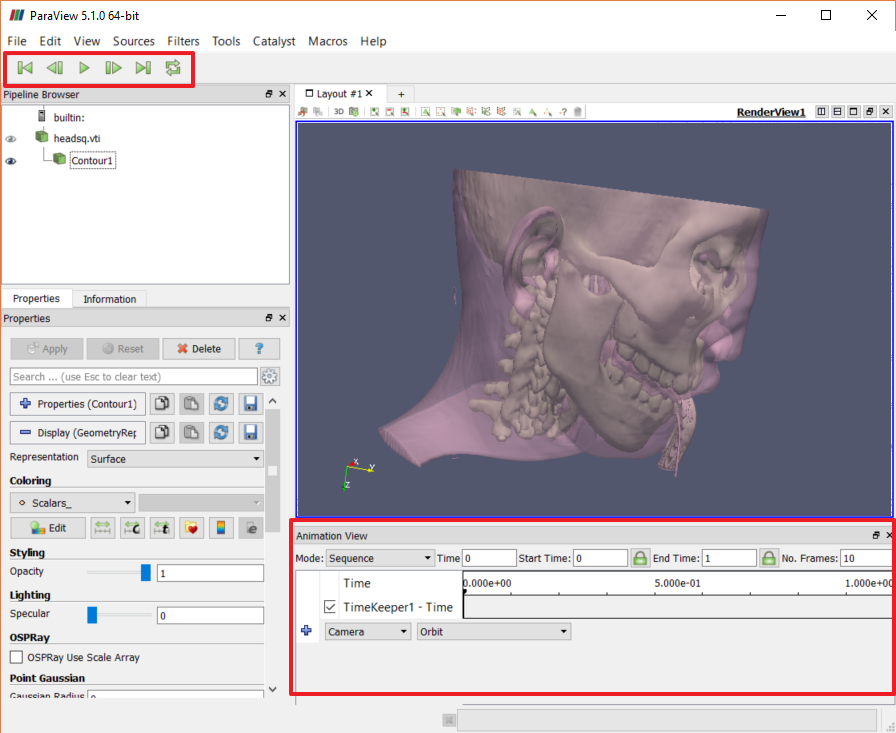
ParaView allows you to generate animations of your visualizations. These animations can either be recorded directly from the ParaView window, or can be saved to an "OGV" file using File→Save Animation. Creating and running animations requires that you display two additional UI elements.
- Use
View→Animation View to show the panel for constructing an animation. - Use
View→Toolbars→VCR Controls to display the toolbar for playing animations.
©
|
Cornell University
|
Center for Advanced Computing
|
Copyright Statement
|
Access Statement
CVW material development is supported by NSF OAC awards 1854828, 2321040, 2323116 (UT Austin) and 2005506 (Indiana University)
CVW material development is supported by NSF OAC awards 1854828, 2321040, 2323116 (UT Austin) and 2005506 (Indiana University)