Create an Instance
Before creating a new Jetstream2 instance you should consider how you plan to use it. There may already be some images that meet your needs, and you want to be sure to use one of those if you can or you will wind up having to do the same customizations yourself. The way you plan to access the instance and the way you hope to use it will guide the options you choose when creating it. Here are several questions to consider before beginning the creation process.
- Which featured or custom image will be the basis for the instance?
- Are you creating an instance from a snapshot of another instance, or using a custom image that has already been configured? If not, do you have a preferred flavor of Linux (Ubuntu, Rocky Linux, AlmaLinux) and version?
- How large of a volume do you need?
-
The default volumes that are offered when you create an instance
are based on the size of the particular operating system you choose.
While they allow some space for the installation of additional software,
you might run out of space quickly if you install a lot of things.
Since volumes cannot be resized through the Exosphere web interface,
you may want to add some extra space to the root volume.
You should also consider how much data you want to store on the instance and whether that amount will grow over time. For very large amounts of data it is reasonable to keep the primary volume smaller (mainly to hold the operating system) and attach a separate volume that will hold your data, code and results. - Do you want a graphical desktop or only shell access?
- While the Linux packages needed to provide a graphical desktop can be install after your instance is created, one of the benefits of using Exosphere is the way it allows instance's desktop to be accessed through the web. For this to work, you should enable web desktops as part of the image creation process.
- Do you want to authenticate to the instance using an SSH key?
- Exosphere makes it easy to set up SSH key authentication on your instance if you provide your public key when the instance is created. The easiest way to do this is by uploading your public key to Jetstream2 before creating an instance that uses it.
When your instance is created it is initially given a single user account, for exouser.
This user is given sudo
priviledges, allowing it to perform actions as the root
user.
After the instance has been created and you log in as this user,
you can use it's root permissions to execute Linux commands that
create additional user accounts and give them the desired permissions.
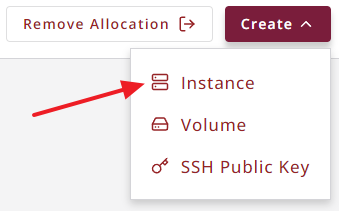
To create a new Jetstream2 instance and start it, visit the Exosphere dashboard
open the Create
menu at the top and select Instance
.
The process of creating the instance begins with Selecting an Image.
CVW material development is supported by NSF OAC awards 1854828, 2321040, 2323116 (UT Austin) and 2005506 (Indiana University)